

I haven't posted pictures on the open forum for a while, I just noticed the insert picture is not showing up on my post. It does show a image link after I submit the post though. My discussion is titled 51 Hornet project with pictures, and my user id is triman62. Thanks to all who work to keep the forums running for us. Preston-triman62

[quote="Preston Patton" post=20769]I haven't posted pictures on the open forum for a while, I just noticed the insert picture is not showing up on my post. It does show a image link after I submit the post though. My discussion is titled 51 Hornet project with pictures, and my user id is triman62. Thanks to all who work to keep the forums running for us. Preston-triman62
Preston,
Thanks for the heads-up; I'll go take a look and see what the issue may be
Preston,
You should see on one of your posts that the pictures now appear in-line. All I did was to download them and then re-upload them and they were inserted into the post by default. That is for me of course under the "Admin" banner 🙂
I'll have a play using the test user and see if that makes any difference.
Hi Preston,
When I first added pictures I used the "Insert File" button available on the comment box and not the "Attach File" option so my bad!
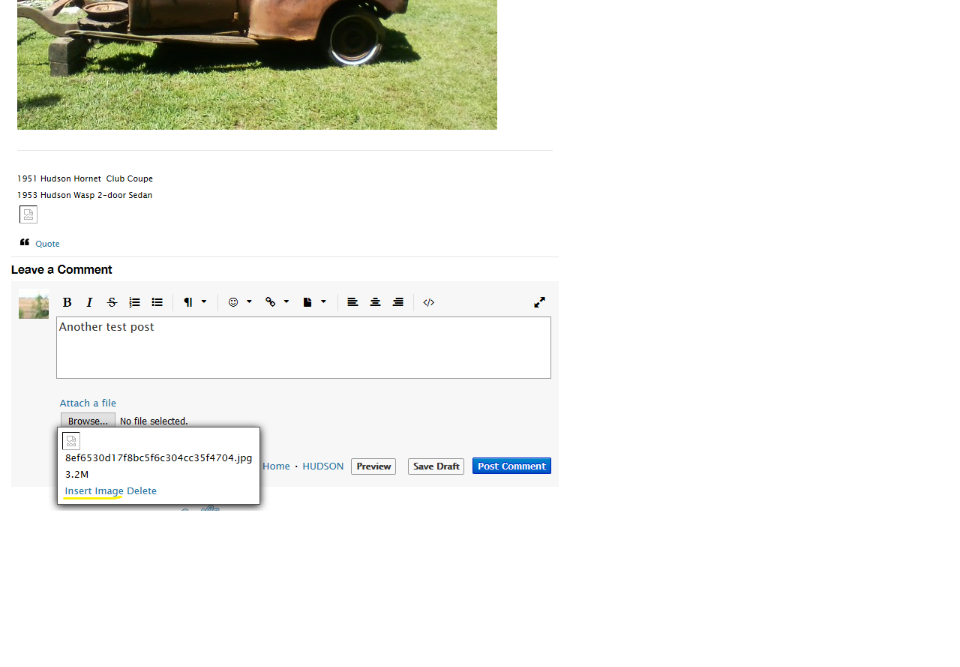
Anyway the way you get your picture displayed "in-line" is when you have added the file hover your mouse over the image icon and the option should then appear in there as seen below. Click on the "insert image" and it will be displayed as part of your post.
Hope that helps 🙂
[quote="Paul Butler" post=20777]Hi Preston,
When I first added pictures I used the "Insert File" button available on the comment box and not the "Attach File" option so my bad!
Anyway the way you get your picture displayed "in-line" is when you have added the file hover your mouse over the image icon and the option should then appear in there as seen below. Click on the "insert image" and it will be displayed as part of your post.
Hope that helps 🙂
Paul, Thanks for the help. I was able to insert pictures that way in the past, but the image icon flashes on for a moment only. I managed to get them inserted inline by deleting them and clicking on them. "
